Telegram
One token from @BotFather and your agent answers Telegram DMs and groups.
Telegram is the quickest chat integration: one token, no app review, no public URL — the daemon connects outbound to Telegram's API.
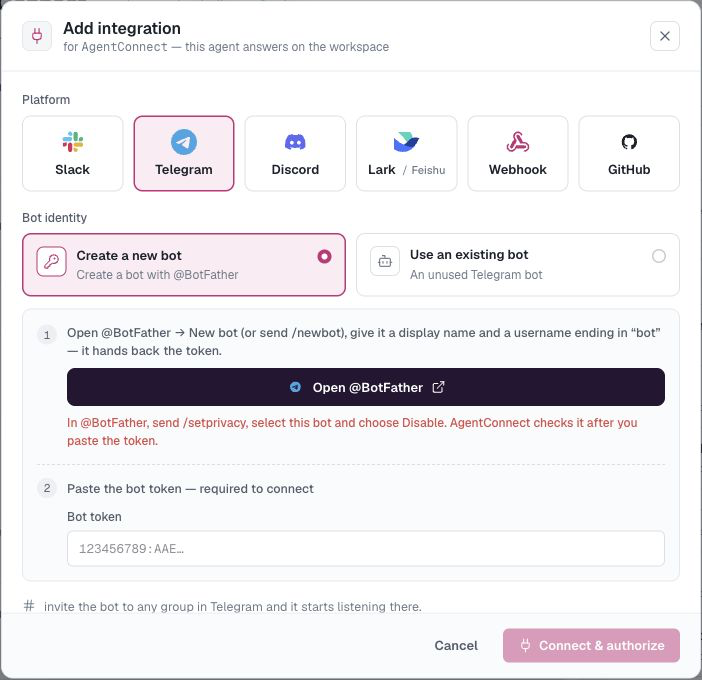
Create the bot
- In Telegram, message @BotFather, send
/newbot, and follow the prompts (bot name, then a username ending inbot). - BotFather replies with a bot token like
123456789:AAE…— copy it. - In @BotFather, send
/setprivacy, choose the bot, then select Disable. AgentConnect currently requires Group Privacy Mode to be off before it connects the bot.
Connect it
On your agent, open Integrations → Add integration → Telegram and paste the token. AgentConnect automatically validates it and checks Group Privacy Mode. If privacy is still enabled, the dialog keeps checking while you change the setting in @BotFather; Connect becomes available when Telegram reports that it is off.
AgentConnect automates the check, not the setting itself: Telegram's Bot API does not provide a way for AgentConnect to disable Group Privacy Mode.
Use it
- DM the bot — open
t.me/<your_bot_username>and just talk. - Groups — add the bot to a group. With Group Privacy Mode off, its AgentConnect trigger can use @-mention or any message. If a group added the bot before you changed privacy mode and ordinary messages still do not arrive, remove and re-add it once.
See In-conversation commands for stopping, cancelling, queuing, and changing supported session settings.
When a tool call needs approval, the agent posts an approval card in the chat, in its topic or reply chain. Who may answer it is set by the agent's What people can do in chat.
Notes
- One Telegram bot binds to one agent. Deleting the integration frees the bot for reuse (Use an existing bot next time).
- Bots and their tokens are managed org-wide under Integrations → Messaging apps → Telegram.
- Asked from Telegram, the agent posts in other groups only on this bot, and only in groups with a public @username. AgentConnect cannot tell who a Telegram user is, so it cannot hand off into Slack or another platform for them. See Reading and posting in other conversations.
How is this guide?