Sandboxing
Choose the boundary each agent's sessions run in and control which resources agents can access.
Kubernetes: the official Helm deployment uses Agent Sandbox by default to manage agent pods and persistent workspaces. See Kubernetes deployment for setup and configuration.
Daemons you run: each agent's Execution strategy sets the boundary its sessions run in, from none to a separate VM. srt and microsandbox run only on Linux; a macOS or Windows daemon offers only host, and the picker shows the other two as unavailable. Each sandbox gets a private runtime home and its assigned workspace. Share additional host directories through mounts.
Choose an execution environment
| Option | Best for | Environment |
|---|---|---|
Host (host) | Trusted tasks that need full host access | Runs directly on the host with the daemon user's permissions |
Sandbox (srt) | Trusted internal development and automation | Host tools with filesystem and network restrictions |
VM (microsandbox) | General-purpose tasks and less-trusted code | A separate VM per session |
| Kubernetes (Agent Sandbox) | Teams running many agents across machines | Centrally managed agent pods and persistent workspaces |
srt is not a security boundary: it shares the host's kernel and user, and the daemon runs some workspace operations outside it, such as Git in a workspace that sessions share. Run an agent that acts on content from outside your organization, such as outside contributors' pull requests and issues or public webhooks, in microsandbox or Kubernetes, even when a maintainer starts its sessions.
Compare Linux daemon sandboxes
| What you use | SRT | microsandbox |
|---|---|---|
| Tools and packages | Host tools; install in writable paths | Image tools; install inside the session VM |
| Host files | Protected paths hidden; other paths may be readable | Only assigned host mounts |
| Shared caches | Shared read-only or writable mounts | Shared mounts or private overlays |
| Internet | Through a proxy (tools must support it) | Public internet (private networks restricted) |
| Local servers | Not published to the host | Not published to the host |
| CPU and memory | No per-session limits configured | Configurable per VM |
| OAuth credentials | Tool rules (Claude/Codex); otherwise unshielded | Same as SRT |
| Saved API keys | Tool rules (Claude/Codex); otherwise unshielded | Host proxy (supported saved keys) |
Both sandboxes write to the assigned workspace. Shared workspaces and writable host mounts remain shared; microsandbox keeps other VM files separate for each session.
Tool rules restrict credential access by the runtime's tools. The host proxy keeps real API keys outside the VM. See Credential protection for supported runtimes, login methods, and limitations.
Technical background: SRT isolation and microsandbox.
Pick an execution strategy
Choose the strategy in Execution strategy when you add or edit an agent. The picker lists the strategies available where the agent is placed:
- One daemon: that daemon's strategies.
- A daemon group: the strategies at least one serving member offers. Sessions can't run on a member that lacks the chosen strategy, so check that every member you rely on can run it.
- AgentConnect Cloud or a Kubernetes daemon pool: no picker. Each session already runs in its own pod.
| Option | Boundary |
|---|---|
Host (host) | None |
Sandbox (srt) | An SRT process sandbox |
VM (microsandbox) | A separate virtual machine |
A strategy that can't run there stays in the list, disabled and marked unavailable. Hover over it to see why: the reason from the daemon's startup check, or sandbox.<strategy> is off on this daemon when the daemon's configuration turns the strategy off.
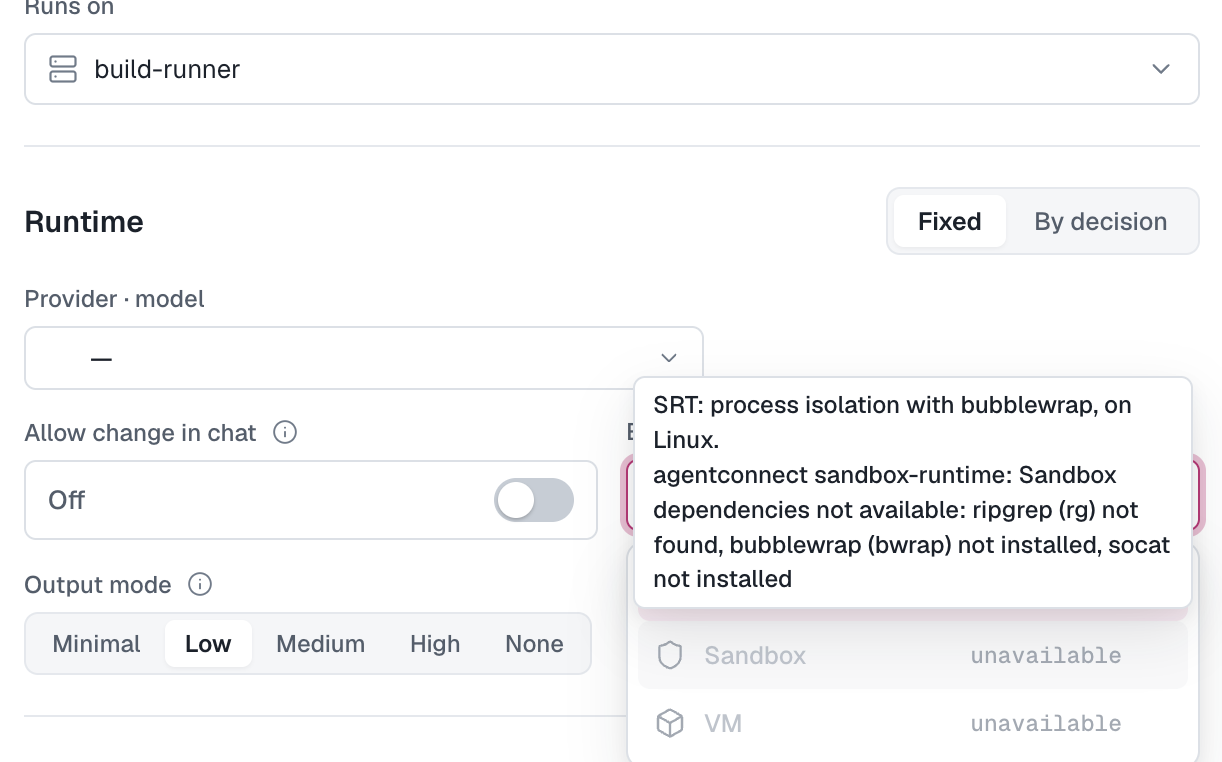
New agents start on host where it can run, otherwise on the first available sandbox. A daemon too old to report its strategies offers host and Sandbox instead, where Sandbox is the sandbox that daemon is configured to use. Upgrade the daemon to choose a specific strategy.
In Edit, the picker is locked while a move to another daemon is pending; save the move first. If the agent's placement no longer offers its saved strategy, the strategy stays selected and is marked "Not offered where this agent is placed." The agent's Configuration tab shows the choice as the Execution strategy row of the Runtime card.
AgentConnect never falls back to a weaker boundary. A session whose strategy can't run on its machine is refused with the reason.
Agents created before the picker keep their boundary. An agent that had Run in sandbox off uses host. One that had it on uses the sandbox its daemon was configured with, srt or microsandbox, once that daemon reports its strategies. A sandboxed agent with no daemon uses srt.
Configure the daemon
Add the settings to the daemon's existing config.json (normally ~/.agentconnect/config.json). Keep its existing connection and identity settings.
The sandbox object lists the strategies the daemon offers. All three are on by default, so leaving them out is the same as:
{
  "sandbox": {
    "host": true,
    "srt": true,
    "microsandbox": true
  }
}
Each value is true (offer the strategy with its defaults), false (turn it off), or, for microsandbox, an object of VM settings. At startup the daemon checks each strategy it offers. A strategy that fails its check is unavailable; the daemon logs the reason, and the picker shows it. The checks install and download nothing. A daemon with no available strategy refuses to start.
SRT
On Ubuntu or Debian, install its dependencies:
sudo apt-get update
sudo apt-get install --yes bubblewrap ripgrep socat
The host must allow unprivileged user namespaces. The daemon checks that the sandbox can start. Ubuntu 24.04 and later restrict them by default, and Ubuntu 23.10 does once the restriction is turned on: allow them for bubblewrap first.
microsandbox
To change the VM resources, give microsandbox an object:
{
  "sandbox": {
    "microsandbox": {
      "cpus": 2,
      "memoryMiB": 2048,
      "diskGiB": 10
    }
  }
}
These resource values are defaults. CPU and memory limits apply per VM. diskGiB sets the capacity of each writable disk (root, Docker data, and an additional disk when using overlays). Disk files grow as data is written.
microsandbox requires a Linux amd64 host. The daemon user needs access to /dev/kvm and /dev/vhost-vsock. Virtual hosts need nested virtualization. The daemon installs the microsandbox SDK and prepares the image when the first microsandbox session starts. An uncached image makes that first start slower.
Require a sandbox
To refuse unsandboxed sessions on a daemon, turn host off:
{
  "sandbox": {
    "host": false
  }
}
The picker then shows host as unavailable for agents on this daemon, and new agents start on the first available sandbox. Agents already set to host can't start sessions there until you pick a sandbox for them. If no sandbox is available either, the daemon refuses to start.
Older configurations
sandbox.backend and security.requireSandbox are retired. A daemon that still finds them reads them once at startup and logs a warning: it ignores backend and offers every strategy as above, and it reads requireSandbox: true as "host": false. Remove them from config.json. Which sandbox a session uses is now the agent's Execution strategy.
Restart after editing the configuration:
npx -y @agentconnect.md/cli restartFor a named instance, add --instance <name>. For a foreground daemon, relaunch its existing command (add --require-sandbox to turn host off). See Upgrade the daemon for instance commands.
Runtime image
microsandbox uses the ghcr.io/agentconnect-md/runtime-sandbox-full image selected by the installed daemon release. To use a compatible custom image:
{
  "sandbox": {
    "microsandbox": {
      "image": "registry.example.com/agentconnect/runtime-sandbox-full:build-tag"
    }
  }
}
Delete the image property to return to the default. Development builds require an explicit image.
Changing the image content, VM resources, mounts, or credential layout rebuilds affected VMs on refresh or next use. Host-mounted workspace, home, and memory files are kept. VM-local files, Docker data, and overlay writes are reset. Keep durable data in host mounts. A new image tag with identical contents reuses the existing VM.
The full image includes Claude Code, Codex, DeepSeek Harness, OpenCode, pi, Oh My Pi, Grok Build, Qwen Code, Cline, Devin, Antigravity ACP, GitHub Copilot, Qoder CLI, and Qoder CN CLI. Antigravity requires AVX support. Amp requires a custom image.
Docker Engine, Buildx, and Compose are also included. Agents can start Docker inside their VM when their runtime permissions allow it. Docker data survives stop/start, but resets when the VM is rebuilt. Codex's tool restrictions currently block the image's sudo-based Docker startup.
Network access
microsandbox sessions can reach public APIs and package registries. Each VM has its own network environment, so sessions can use the same local port. VM ports are not published to the host.
The policy restricts private-network access, but does not guarantee that every public IP or DNS name leading back to the host is blocked. SRT allows outbound web access through its proxy; tools that ignore proxy settings may fail to connect.
Troubleshooting
| Message | What to check |
|---|---|
| Strategy unavailable | The reason in the picker's tooltip, the strategy's requirements, and daemon logs |
| Session refused by strategy | The agent's strategy can't run on that machine; fix the reason or pick another one |
| Binary not installed in image | The selected image contains the runtime |
| Login required | The runtime is signed in as the daemon user |
| Mount rejected | Existing source, valid target, and supported mode (see Mounts) |
| VM replacement failed | Check image availability and mount access, then retry |
The standalone chat command supports SRT. Use daemon-hosted sessions for microsandbox.
Ubuntu 23.10 and later: allow user namespaces for bubblewrap
Symptom: the Sandbox strategy (srt) is marked unavailable in the Execution strategy picker, and its reason contains one of:
bwrap: loopback: Failed RTM_NEWADDR: Operation not permitted
bwrap: setting up uid map: Permission denied
Newer daemons name the AppArmor restriction in the reason directly.
Cause: Ubuntu 24.04 and later set kernel.apparmor_restrict_unprivileged_userns=1 by default, in /usr/lib/sysctl.d/10-apparmor.conf. Ubuntu 23.10 introduced the setting but leaves it at 0 by default. With it on, an unprivileged user namespace gets no capabilities, so bubblewrap can't set up the sandbox's isolated network. A value of 0 set at runtime, for example with sysctl -w, is lost on reboot.
Fix: give bubblewrap an AppArmor profile that allows user namespaces. The profile covers only /usr/bin/bwrap, where the bubblewrap package installs it; every other program stays restricted. Create /etc/apparmor.d/bwrap and load it:
sudo tee /etc/apparmor.d/bwrap > /dev/null <<'EOF'
abi <abi/4.0>,
include <tunables/global>

profile bwrap /usr/bin/bwrap flags=(unconfined) {
  userns,
  include if exists <local/bwrap>
}
EOF
sudo apparmor_parser -r /etc/apparmor.d/bwrap
AppArmor loads the profile again at every boot.
Don't use Ubuntu's bwrap-userns-restrict profile from the apparmor-profiles package instead. It strips capabilities inside the sandbox, so the daemon's check passes, but a runtime that starts its own bubblewrap sandbox inside it, such as Codex, fails with bwrap: No permissions to create new namespace.
Alternatively, lift the restriction for the whole machine. This turns the protection off for every program, not only bubblewrap:
echo 'kernel.apparmor_restrict_unprivileged_userns = 0' | sudo tee /etc/sysctl.d/60-userns.conf && sudo sysctl --systemVerify: as the daemon's user, run:
bwrap --unshare-net --ro-bind / / true && echo okIt prints ok when bubblewrap can start with its own network.
Then restart the daemon so it checks its strategies again: choose Restart from the daemon's actions in the console, or restart it on the host with npx -y @agentconnect.md/cli restart or your service manager.
How is this guide?