MCP connector
Add AgentConnect to Claude or any MCP client — inspect and manage agents, sessions, schedules and integrations in plain language.
AgentConnect ships a hosted MCP server at:
https://mcp.agentconnect.mdAdd it to Claude (or any client that speaks MCP over streamable HTTP) and your assistant can work with your organization for you:
"Which of our agents are online right now?" "What did we spend on tokens this week, per agent?" "Did the nightly report schedule run — and did it succeed?" "Create a weekday schedule for the reviewer agent."
Inside AgentConnect you do not need to connect anything: in a single-agent Playground conversation, the agent uses the same tools, and each change waits for your approval in the console.
Connect from Claude
Claude (claude.ai / desktop): Settings → Connectors → Add custom connector, paste https://mcp.agentconnect.md, and finish in the browser: sign in with an enabled provider, pick the organization to bind, review the read and write access requested by the client, and Authorize. No keys to copy — the flow is standard OAuth 2.1 with dynamic client registration.
Claude Code:
claude mcp add --transport http agentconnect https://mcp.agentconnect.mdthen approve the browser sign-in when prompted (/mcp → authenticate). For headless environments (CI, servers) skip OAuth and attach an API key instead:
claude mcp add --transport http agentconnect https://mcp.agentconnect.md \
  --header "Authorization: Bearer $AGENTCONNECT_API_KEY"
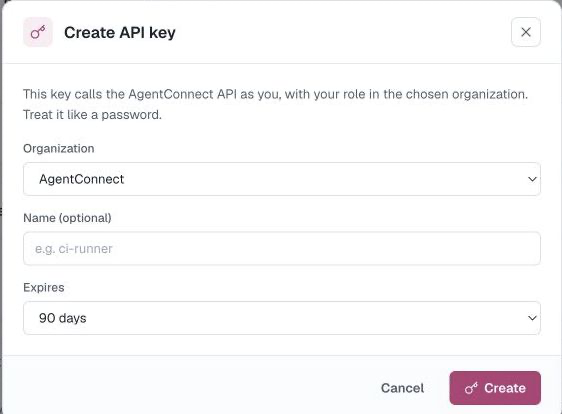
Any other MCP client works the same way: OAuth if it supports the authorization-code flow, otherwise a personal API key in the Authorization: Bearer header.
Read tools
With mcp:read, an assistant can inspect:
| Area | Tools |
|---|---|
| Identity | whoami |
| Agents | listAgents, getAgent |
| Daemons | listDaemons, getDaemon, listDaemonCapabilities |
| Workspaces | listWorkspaceFiles, readWorkspaceFile |
| Schedules | listCrons, getCron, listCronRuns |
| Sessions | listSessions, getSession |
| Analytics | getUsage |
| Integrations | listIntegrations, listBots, listAgentHooks, listHookRuns |
| Code hosts | listGithubInstallations, listGithubRepositories, getGithubRepositoryAccess, listGitlabConnections, listGitlabBots, listGitlabProjects, listGiteaConnections, listGiteaRepositories |
| Decisions | listDecisions, getDecision, listDecisionProviders, getBotDecisionRouting, getCodeHostDecisionRouting, listDecisionEvaluations |
| Members | listMembers |
whoami returns the current identity, organization, and role. Session tools return status, usage, and links—not transcript contents. listBots returns metadata, never token material; getUsage includes totals and per-agent breakdowns. getDaemon lists each runtime's models with the efforts and permission modes they accept. Workspace tools read an agent's files live from its daemon. Transcripts stay on your daemons.
Write tools
When the client requests and you approve mcp:write, it can also make these changes:
| Area | Tools |
|---|---|
| Agents | createAgent, updateAgent, setAgentWorkspace, deleteAgent |
| Daemons | renameDaemon |
| Schedules | upsertCron, runCron, deleteCron |
| Integrations | setChannelTrigger, createGithubTrigger, removeIntegration |
| Decisions | createDecision, updateDecision, deleteDecision, saveBotDecisionRouting, saveCodeHostDecisionRouting, deleteCodeHostDecisionRouting, previewDecision, previewIntegrationChannelDecision, previewBotDecisionRouting |
The write catalog is deliberately narrower than the console and REST API. It does not expose credentials, members, organization settings, access-control lists, or bot secrets.
deleteAgent, setAgentWorkspace, deleteCron, removeIntegration, deleteDecision, and deleteCodeHostDecisionRouting are destructive; setAgentWorkspace can discard the agent's checkout on its daemon, including uncommitted work. Each requires an exact live confirmation value — the agent's name for the two agent tools, the integration or Decision name, the schedule name/ID, or the repository's owner/repo — in addition to the client's own approval flow. A mismatched or missing confirmation is rejected.
Console dialogs
Some setup needs a credential or a choice made in the browser. These tools open the matching console dialog instead of changing anything themselves:
| Dialog | Tool |
|---|---|
| Add or edit an integration | configureIntegration |
| GitHub, GitLab, and Gitea connections | manageCodeHosts |
| An agent's editor | configureAgent |
| An agent's tools and skills | manageAgentTools |
| Install a skill | installSkill |
| Add an MCP server | installMcpServer |
In a single-agent Playground conversation, the dialog opens in the console, prefilled where it can, and you finish it there. Other clients show a page that points to the console instead.
Permissions & trust
- A connection acts as you, in one organization — the one you picked at consent (or the org your API key is bound to). Connect again to use another org.
- OAuth access is scope-confined:
mcp:readexposes only read tools, whilemcp:writeis required for write tools. A personal API key follows its permission: a Full access key carries your whole role, a Read-only key reaches only the read tools, and an Agent chat key cannot use the connector at all. - Your role and per-resource visibility apply unchanged: the tools call the same REST surface as the console, so a Viewer's connector can't see or change more than that Viewer can in the console, and restricted resources stay hidden.
- Revoke the OAuth connection or personal API key when a client should no longer act as you.
How is this guide?