Decisions
Ask one question about a message with Jev, then let each channel, bot, repository, or agent act on the answer.
A Decision asks one question about an incoming message and returns a typed answer: Yes / No, one of your categories, or a score. It only defines the question. What an answer does is set where you use the Decision: a channel can respond or stay quiet, a shared bot can route a new conversation to a specialist, a repository can pick its reviewers, and an agent can pick the runtime and model for a new session.
Decisions are evaluated by Jev, TypeSafe's judgment model. Jev returns a probability for every possible answer instead of generated text, and answers in under a second. The evaluation runs on the daemon that serves the agent; it starts no session, and the answer grants no permission of its own.
Set up the provider
Where the evaluation runs decides how it is paid for:
- AgentConnect Cloud. Agents on Cloud's managed infrastructure evaluate Decisions with no setup. Each evaluation is deducted from the organization's credit balance at TypeSafe's published price, like any other Cloud model usage.
- Your own daemons, including every self-hosted deployment. An organization owner opens Infra → Provider keys and adds an API key to TypeSafe (Jev). Connection settings can point at another endpoint or add extra headers.
A configured key always takes precedence, including for agents on Cloud, and those evaluations are not charged to credits. The key is write-only: the Control Plane stores it with the deployment's other write-only secrets and hands it only to a daemon serving one of your agents when that daemon evaluates. A self-hosted deployment encrypts those secrets at rest only after you configure a secret cipher; the default stores them as plaintext in PostgreSQL. Saving a key does not test it; run an example in the Decision editor to check it.
Create a Decision
Open Decisions and choose Add decision. An empty page offers ready-made examples — Needs reply, Spam, Support category, Issue type, PR focus, PR author, and Task complexity — that you can add and then edit.
You can also describe the question in a single-agent Playground conversation and let the agent draft the Decision for you. After you approve it, open it here and try it with an example.
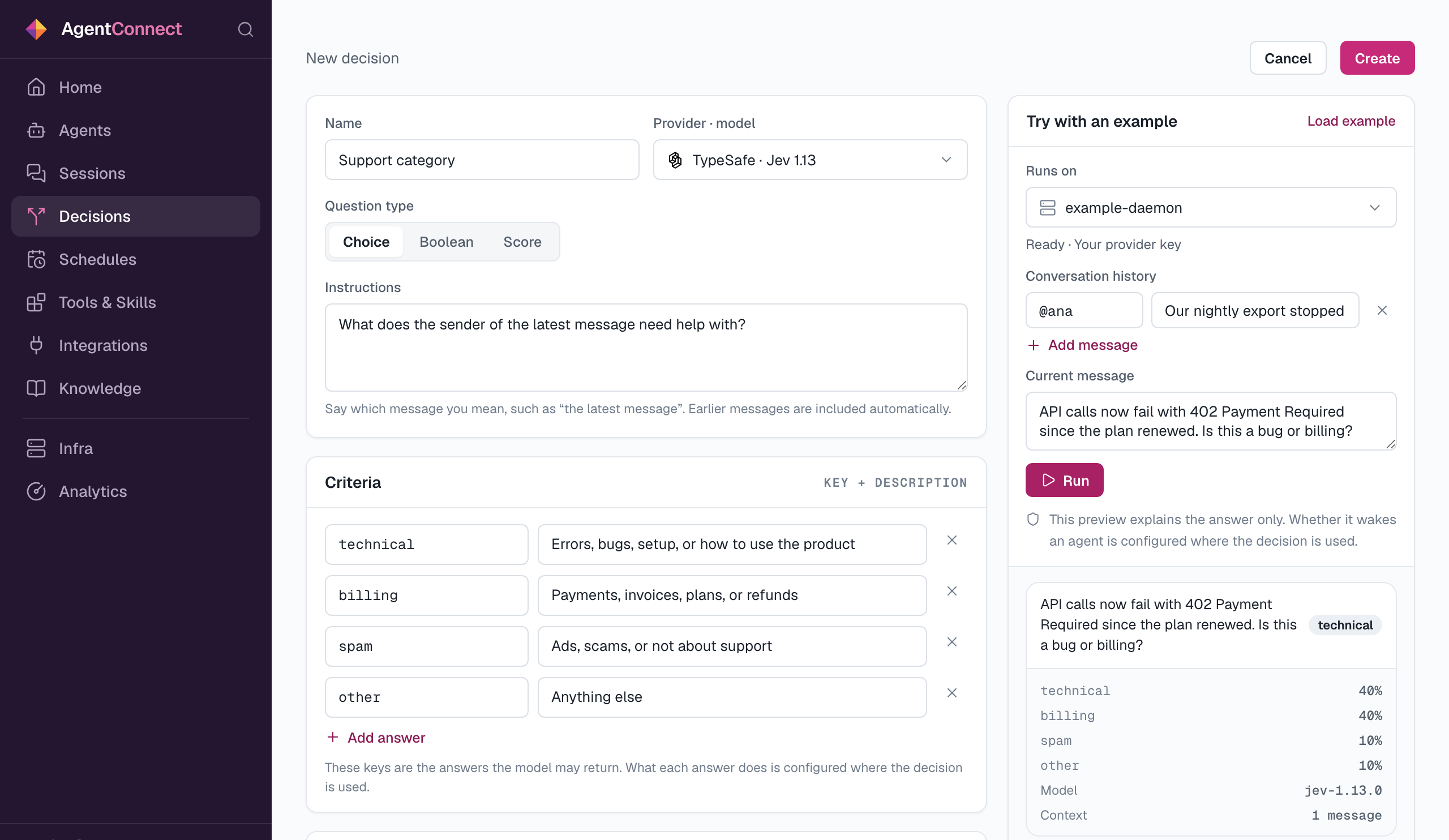
| Field | What it sets |
|---|---|
| Name | How the Decision appears wherever it is used |
| Provider · model | The Jev model: Jev 1.13, Jev latest, or Jev preview |
| Question type | Choice returns one of your keys, Boolean returns Yes or No, Score returns a number on your scale, decimals included |
| Instructions | The question. Say which message you mean, such as "the latest message"; earlier messages in the conversation are included automatically |
| Criteria | What each answer means: 2–32 Choice keys, Yes and No, or 2–10 ordered Score levels |
| Visibility | Everyone, or Selected members and organization owners |
Try with an example evaluates a sample conversation for real. Pick the daemon it Runs on, add some Conversation history, write the Current message, and choose Run to see each answer's probability, the model, and how much context was sent. The preview only explains the answer. Whether that answer wakes an agent depends on the rules where the Decision is used, and each place has its own preview for that.
A Decision can be reused in many places. Its Recent evaluations card lists every place that uses it and the latest answers from each. Editing the question affects all of them. If a change to the criteria leaves a place's rules pointing at answers that no longer exist, that place shows Needs review and stops evaluating until someone repairs it. A Decision cannot be deleted while it is still used.
Where to use a Decision
| Where | Set it in | The answer decides |
|---|---|---|
| A chat channel | An agent's Integrations tab → channel row → Add decision | Whether the agent responds |
| A shared bot | Integrations → shared bot → Default dispatch → Or pick by decision | Which agents take a new conversation |
| Issues and pull requests | An agent's GitHub, GitLab, or Gitea event row → Add decision | Which watching agents take it |
| An agent's runtime | Edit agent → Runtime → By decision | The runtime and model of each new session |
| An agent's tools | Agent → Tools & Skills → Decisions | Whatever the agent uses the answer for |
Channels, shared bots, repositories, and runtimes can also chain Decisions, asking a second question after the first.
Respond in a channel
By decision is a channel trigger next to @-mention, Any message, and Off. It works in channels and group conversations on every chat platform and on Linear team rows; one-to-one direct messages keep their On / Off switch. Choose Add decision on the channel row, pick the Decision, and set Trigger when:
- Boolean — Yes, No, or both.
- Choice — the answers that should wake the agent, each with a minimum probability. Any selected answer at or above its minimum triggers the agent once, even when it is not the top answer.
- Score — a From / To interval on the scale.
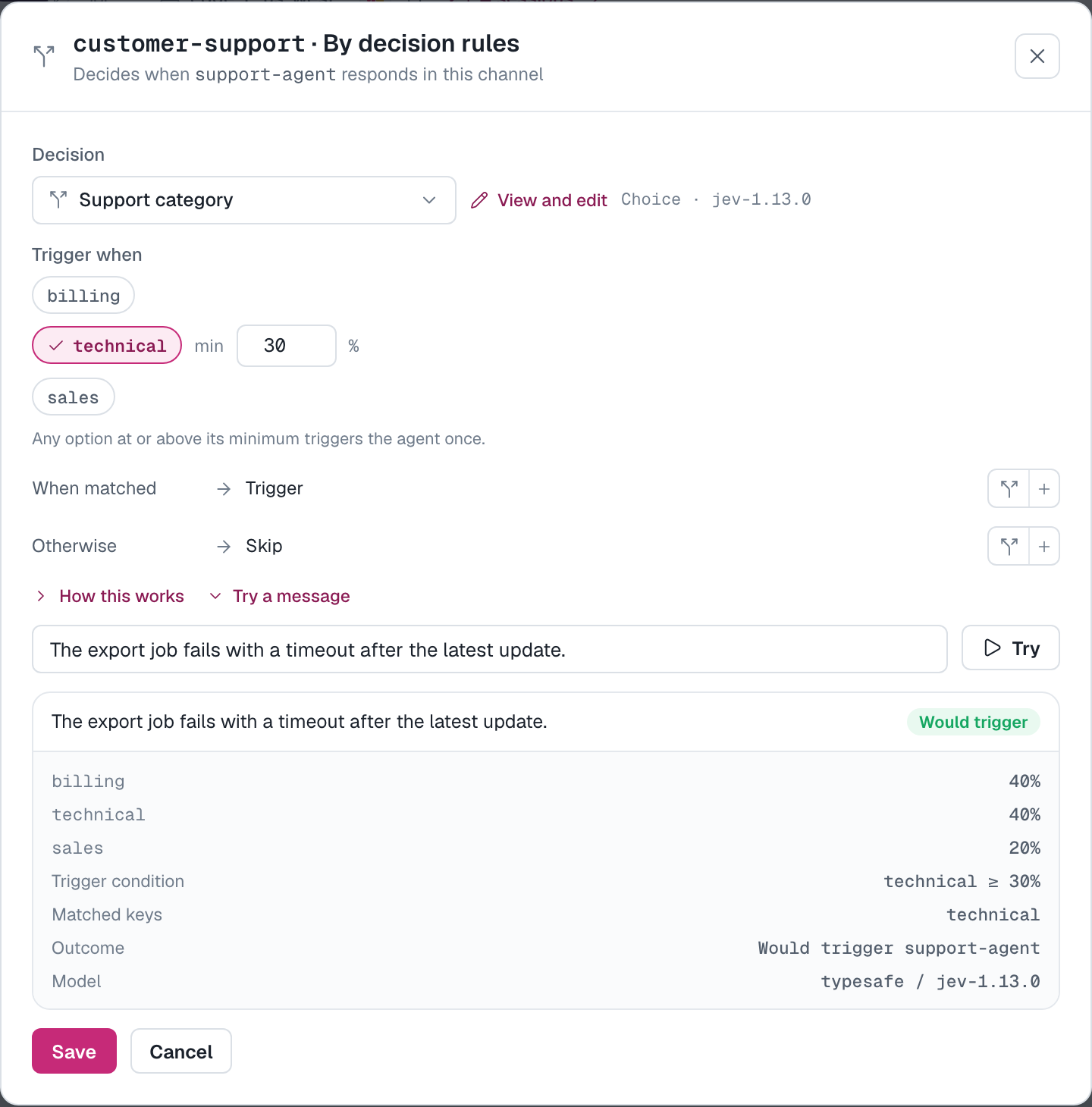
Every new top-level message is judged, including messages that @-mention the agent: a mention only fixes which agent may respond. Replies in a thread the agent has already joined continue without a new evaluation. A skipped message starts nothing, but it stays in the conversation history that later evaluations and the agent can read. Try a message shows whether a sample message Would trigger or would be skipped under the rules you are editing.
Route a shared bot
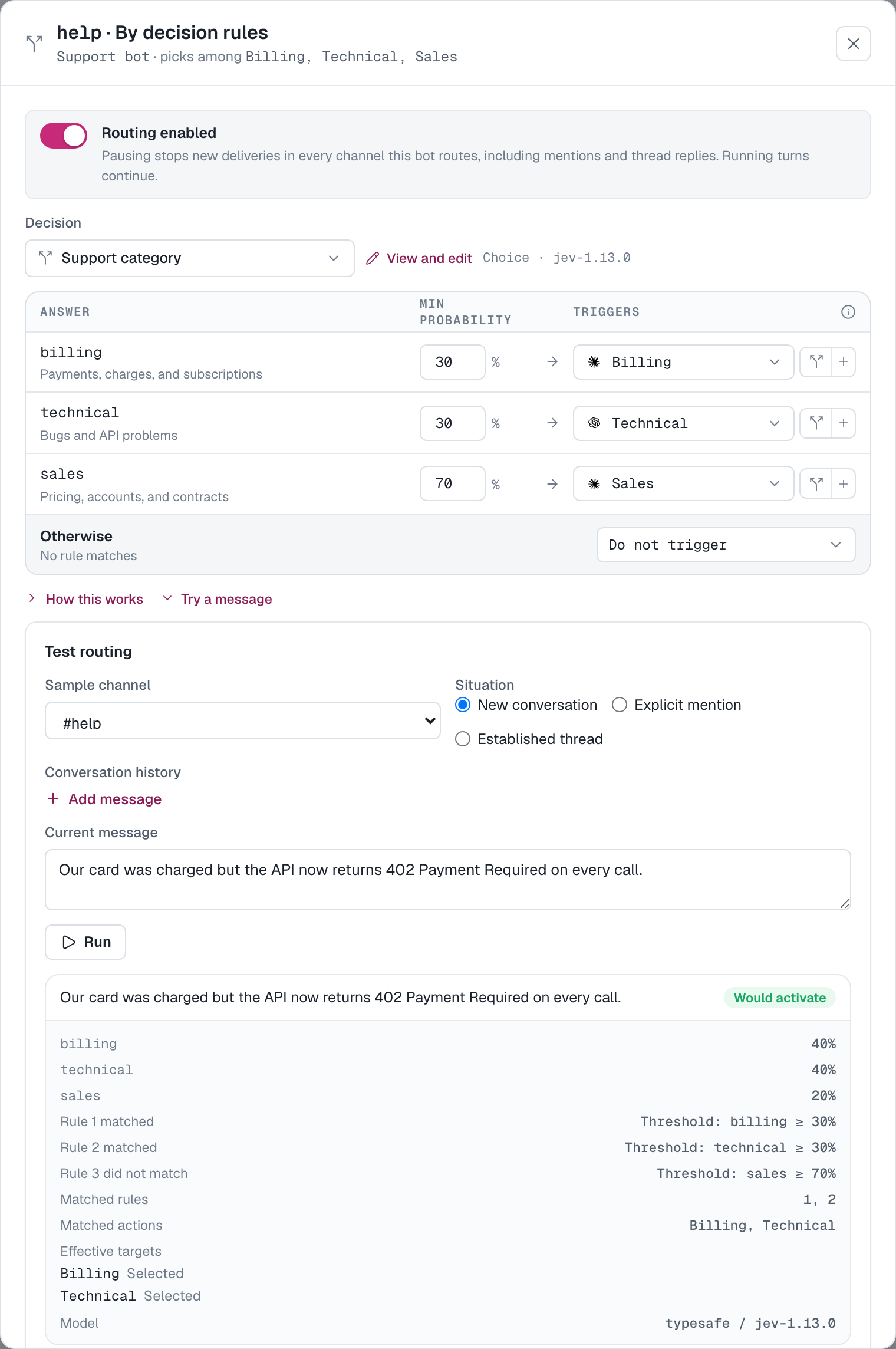
A shared Slack bot that uses HTTP callbacks and serves more than one agent can choose the agent per conversation instead of per channel. On the Integrations page, expand the bot, open a channel's Default dispatch, and choose Or pick by decision. Each rule sends an answer to one of the bot's agents or to Do not trigger; Otherwise applies when no rule matches and is either Use default agent or Do not trigger.
- With a Choice question, every rule whose answer passes its minimum matches, so one message can bring in several agents. Each agent is started once. A matching Do not trigger rule does not cancel another matching rule.
- Only a new conversation that addresses no agent is routed by the rules. A mention or an established thread keeps its agents, and is still judged: a skip still skips.
- Routing paused stops new deliveries in every channel the routing covers, including mentions and thread replies. Running turns continue.
- Try a message opens Test routing, which previews a new conversation, an explicit mention, or an established thread before you save.
Pick agents for issues and pull requests
When several agents watch the same repository, a Decision can choose which of them take each issue or pull request (merge request on GitLab). Choose Add decision on the agent's Issues or pull request event row in its GitHub, GitLab, or Gitea integration. The rules belong to the repository and event type, so every watching agent shares them, and changing them requires edit access to all of those agents.
The Decision reads the title, description, and discussion, and for a pull request the commits and diff where available. It judges every update, and the event row's own trigger no longer applies. A mention does not pick the agent either: mentioned events are judged too, and the Decision's choice wins. Otherwise sends the event to every watching agent, as it would without a Decision, or to none. If the Decision needs review or is no longer available, new issues and pull requests on that repository are held until someone repairs the rules or stops using the Decision.
Choose a runtime and model
In an agent's Edit dialog, switch Runtime from Fixed to By decision. Each rule maps an answer to a provider and model, with its own effort, approval, and fast-mode settings, and a Fallback provider and model covers everything else. For a Choice question the highest passing probability wins.
A reviewer agent can use this for cross-model review with the PR author example: a pull request written by Claude is reviewed on a Codex model, and one written by Codex or Grok is reviewed on a Claude model.
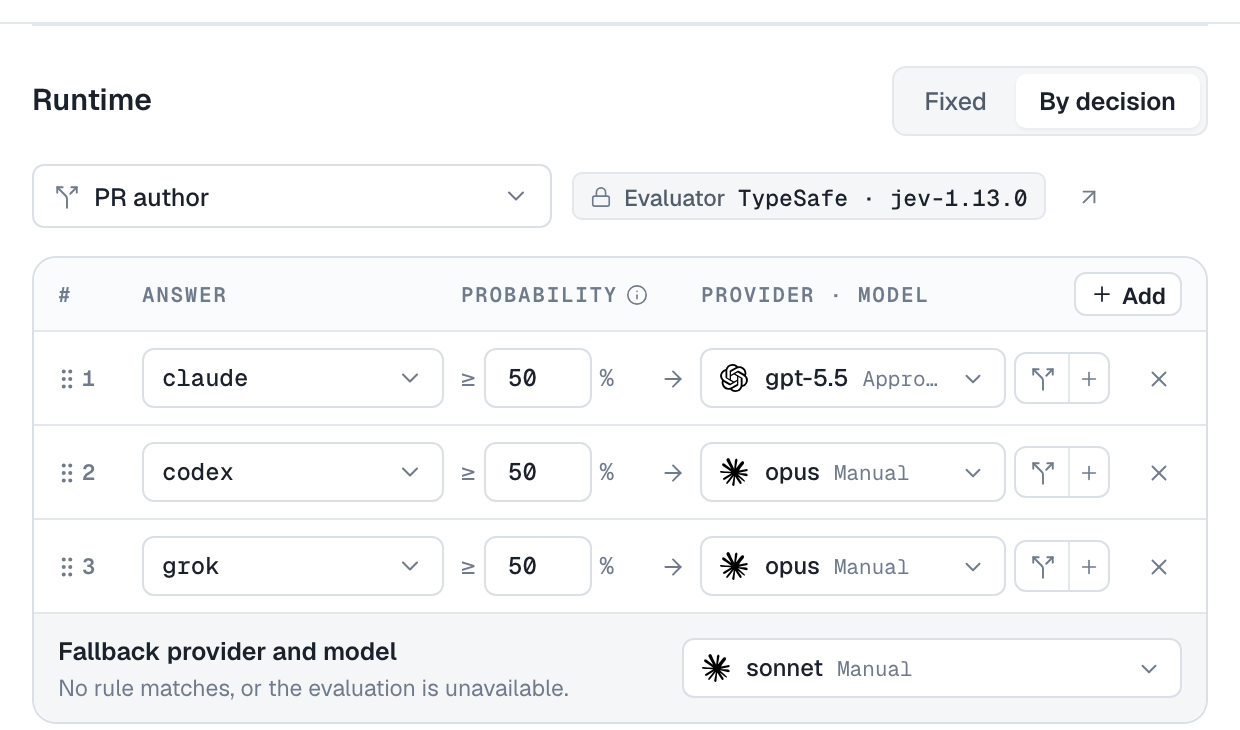
The Decision is evaluated once, when a session starts, using the triggering message; issues and pull requests also contribute their subject and history. Existing sessions keep the runtime and model they started with. Try a sample illustrates how your rules would match without running an evaluation.
Let an agent ask
Attach Decisions under the agent's Tools & Skills → Decisions card to let the agent evaluate them itself during a turn, such as classifying a ticket before choosing how to handle it. The agent supplies the context in its call. The answer is information for the agent to use; it gives the agent no permission it did not already have.
Chain Decisions
Some questions are easier to ask in two steps. A support agent might answer technical questions only when the sender is also frustrated: first Support category, then, when technical matches, Customer frustration from 2 to 3. Choose Continue with a Decision next to When matched or Otherwise in a channel's rules, or next to any rule in shared-bot, repository, or runtime rules, and set the next Decision's own conditions in the sheet that opens.
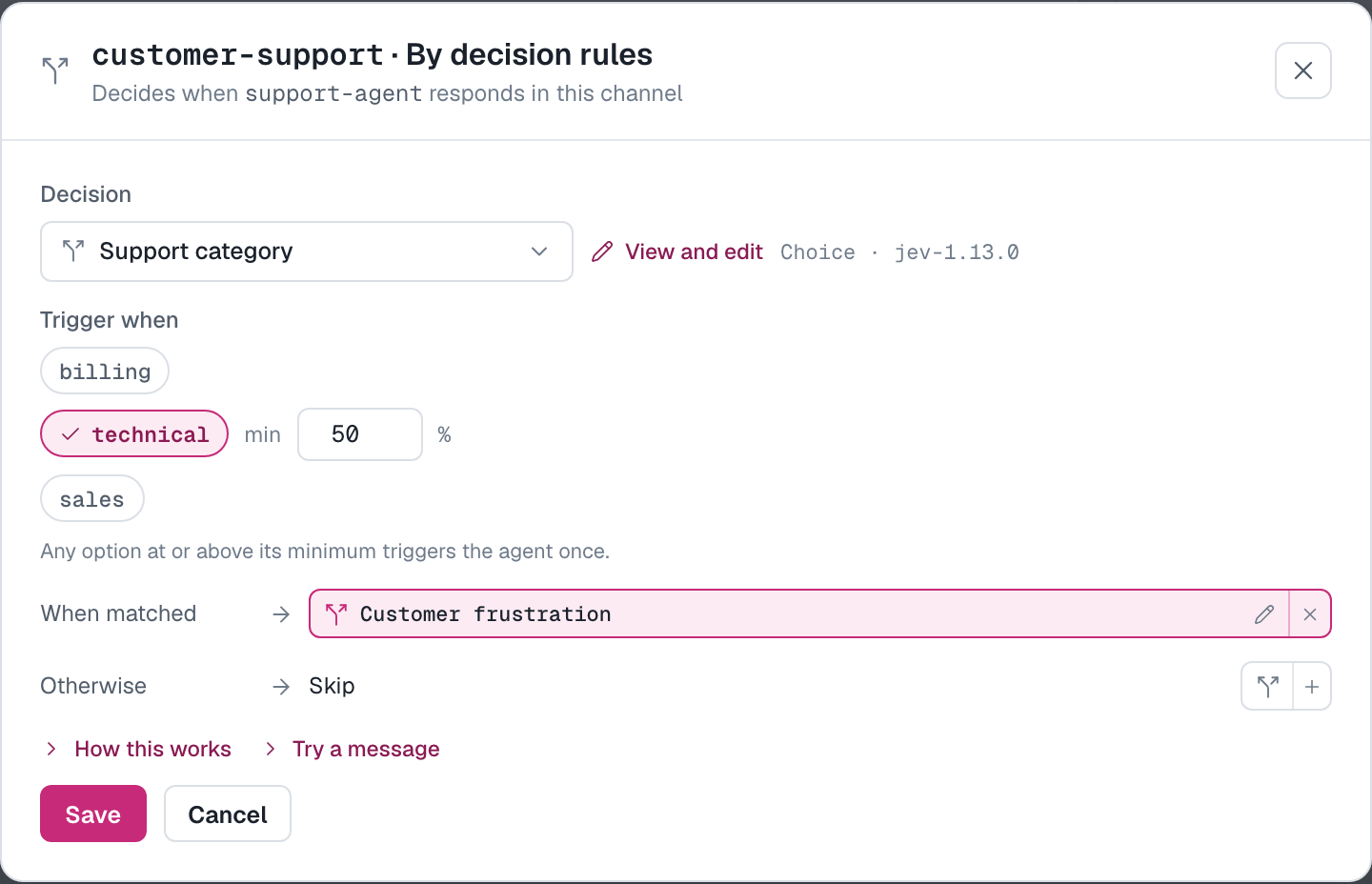
The continued step appears as a chip; select it to edit that step. A chain holds up to eight Decisions, and every step shares one five-second deadline, so each extra step adds to the time before the agent starts.
When a Decision cannot answer
An evaluation is unavailable when the provider errors or times out, no key or credits are available, or the daemon is at capacity. Unavailable is never treated as No or as a skip:
| Where | What happens instead |
|---|---|
| Chat channel | The message continues to the agent, as if the channel triggered on it |
| Shared bot | Addressed or continuing agents keep the message; a new conversation goes to the channel's default agent, even when Otherwise is Do not trigger |
| Issues and pull requests | Every watching agent takes the event, as it would without a Decision |
| Runtime | The session starts with the fallback provider and model |
A place that cannot run its Decision at all says why on its row: Pending sync, Needs review, Daemon offline, Unsupported (the daemon or relay must be upgraded), or Access revoked.
How is this guide?