Webhooks
An HTTPS endpoint that turns any POST into an agent session — from a sender you write, or from an existing system with its own payload format.
A webhook integration gives an agent an inbound HTTPS endpoint. Anything that can POST JSON — CI, monitoring, cron on another box, your own app — can start the agent.
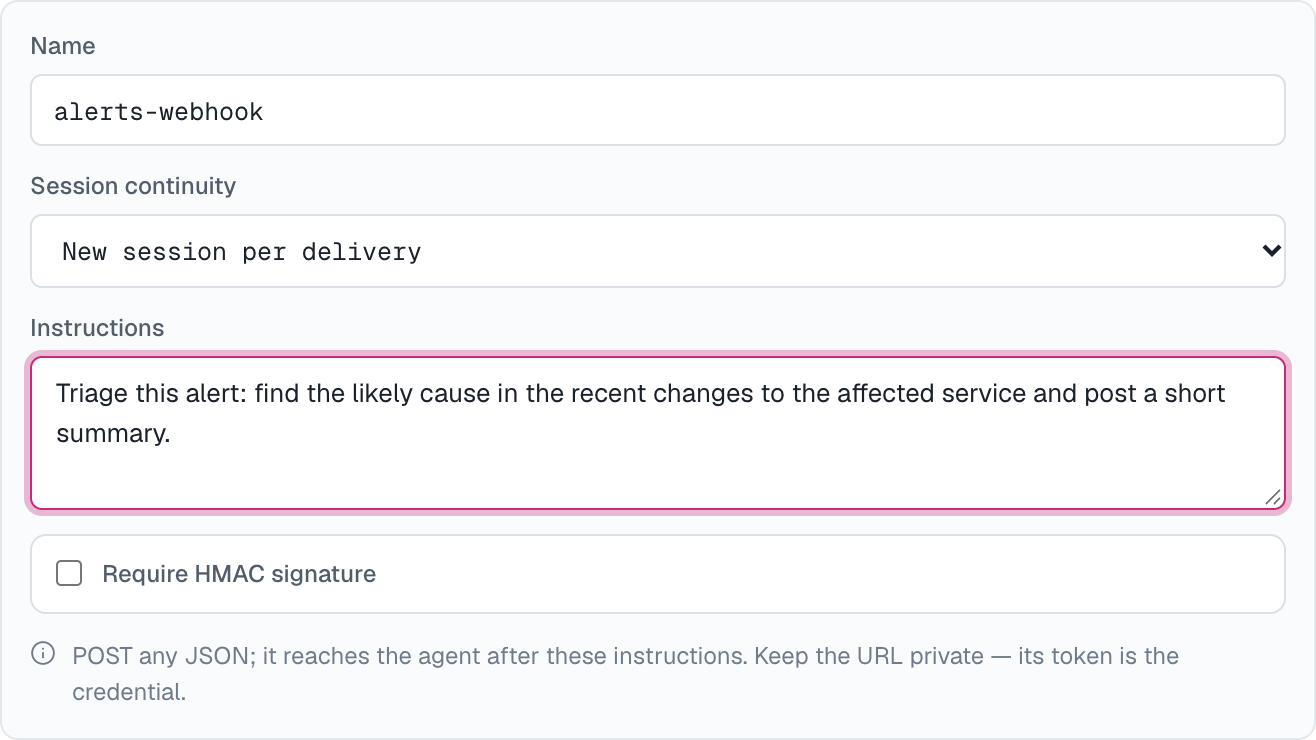
Create one
On the agent: Integrations → Add integration → Webhook, then set:
- Name — defaults to
<agent>-webhook. - Session continuity — which deliveries share a session (see Sessions).
- Instructions — optional. What the agent should do with each delivery. Leave it empty when the sender writes the message itself; fill it in when the sender is an existing system whose payload you can't change (see Two ways to tell the agent what to do).
- Require HMAC signature — optional. Adds a signing secret on top of the URL.
Create, and the dialog reveals:
- Inbound endpoint — the
POSTURL for this integration. Its token is the credential: keep the URL private. - Signing secret — only when you required a signature. Shown only once; copy it now.
- Send a test delivery — a ready-made curl with an editable message, so you can fire a test before writing any code.
To change the instructions later, use the pencil button on the webhook's row in the agent's Integrations card.
Two ways to tell the agent what to do
The sender writes the message. Leave Instructions empty. The agent reads the request body's prompt, text or message string field (the first one present) as its instruction, and gets every other field as context. A body with none of those fields is handed over whole. Use this when you control the sender: a CI step, a script, your own app. Put the instruction before large logs or diagnostic payloads:
curl -X POST "$WEBHOOK_URL" \
  -H "content-type: application/json" \
  -d '{"message":"Deploy of api-server v2.31 failed on step migrate — investigate and summarize.","log_url":"https://ci.example.test/runs/1234"}'
The webhook carries the instructions. Fill in Instructions — for example "Triage this alert: find the likely cause in the service's recent changes and post a short summary." Every delivery then reaches the agent as those instructions followed by the complete request body, which the agent treats as data, not as instructions. No field is picked out. Use this to point an existing system with a fixed payload format — an alerting tool, an error tracker, a form service — straight at the agent. What such a system relays (an error message, an alert description) can be written by anyone, which is why it is never read as an instruction once the webhook has its own.
Instructions can be up to 8,000 characters. In both cases the agent's own description still applies.
Sign requests
With Require HMAC signature on, every request must carry an HMAC-SHA256 of the raw request body, keyed with the signing secret and sent as X-AC-Signature: sha256=<hex>:
BODY='{"message":"Nightly import finished with 3 rejected rows — summarize them."}'
SIG=$(printf '%s' "$BODY" | openssl dgst -sha256 -hmac "$WEBHOOK_SECRET" -r | cut -d' ' -f1)

curl -X POST "$WEBHOOK_URL" \
  -H "content-type: application/json" \
  -H "X-AC-Signature: sha256=$SIG" \
  -d "$BODY"
A request with a missing or wrong signature is rejected exactly like an unknown URL.
Sessions
Session continuity decides which deliveries the agent sees together:
- New session per delivery (default) — every POST starts its own session.
- One session per subject — deliveries with the same
X-AC-Session-Keyheader value continue one session, so a ticket, an order or a conversation builds up context across events. A delivery without the header gets a session of its own. - One shared session for the whole hook — every delivery continues the same session.
Each session appears in Sessions with the webhook as its trigger, full transcript included. The webhook's row on the agent's page shows when it last fired, and its history button lists recent deliveries with their outcome and session.
Request reference
| Method and type | POST with content-type: application/json |
| Body size | Up to 128 KiB. The agent reads the first 64 KiB and is told when a body was cut. |
X-AC-Delivery-Key | Optional, up to 200 characters. Identifies one delivery: a retry with the same key is absorbed instead of running twice. One is generated when absent. |
X-AC-Session-Key | Optional, up to 200 characters. Groups deliveries into one session when the webhook uses One session per subject. |
X-AC-Signature | sha256=<hex> — required only when the webhook requires a signature. |
202 | Accepted; the body is {"deliveryKey":"…"}. The agent runs after the response. |
404 | Unknown URL, or a missing or wrong signature. |
429 | Too many deliveries for this webhook — bursts of 10, then about one per second. Retry later with the same delivery key. |
Tips
- Pair webhooks with a GitHub workspace so the agent can actually inspect the code it's being told about.
- Rotate the URL (and secret) by deleting the webhook integration and creating a new one. Editing a webhook never changes its URL.
How is this guide?