Azure DevOps
Connect an Azure DevOps organization with one Microsoft sign-in, work in Azure Repos, and trigger agents from pull requests and comments.
An Azure DevOps integration lets agents work in Azure Repos: a Git repository can be an agent's workspace or one of its additional repositories, and an agent can watch a repository so that pull requests and comments become sessions. The agent answers in the pull request's comment threads, can submit a formal review with a vote, and reports its run as a pull-request status.
It works with Azure DevOps Services (dev.azure.com). Azure DevOps Server, TFVC repositories and SSH remotes are not supported.
AgentConnect acts in Azure DevOps as one identity per organization: the AgentConnect application, which your Microsoft Entra tenant knows as a service principal. Everything every agent does — clone, push, comment, review, status — is attributed to that application.
Before you start
- A Microsoft work or school account that is a Project Collection Administrator of the Azure DevOps organization and a member or guest of the organization's Microsoft Entra tenant. Personal Microsoft accounts cannot connect.
- Agents that use Azure DevOps run on a daemon you operate, with the Host or Sandbox (
srt) execution strategy. AgentConnect Cloud's managed sessions, Kubernetes daemon pools and the VM strategy cannot reach Azure DevOps yet, and a session there is refused with the reason.
Connect Azure DevOps
An organization connects once, in Integrations → Code hosts → Azure DevOps → Connect with Microsoft.
-
Sign in with the administrator account above. If your tenant asks for administrator approval, a Microsoft Entra administrator grants consent to the AgentConnect application once, and then you sign in again.
-
Choose the organization. AgentConnect lists the Azure DevOps organizations your account belongs to. If the organization lives in a different tenant than the one you signed in to, you are sent to sign in at that tenant.
-
Choose projects. Check each project agents need. A checked project starts at Write with Allow triggers:
Choice What it gives the application Read Agents can clone and read, but not push (the project's Readers). Write Agents can also push and open pull requests (Contributors). Allow triggers Pull requests can start agents (the project's service hook rights). All projects grants the same choices on every project, including projects created later, so new projects need no visit here. Only a Project Collection Administrator can turn it on.
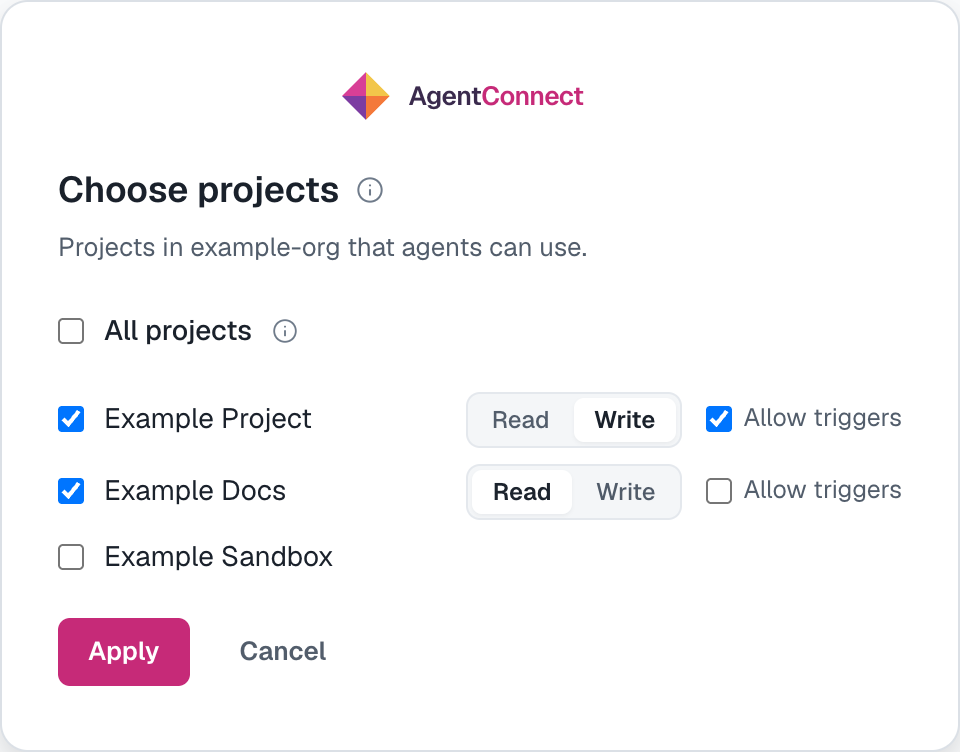
AgentConnect then adds the application to the organization with the Basic access level, which uses one paid licence, adds it to the groups you picked, and checks that it can see the repositories.
Grant only the projects agents need. The application can reach everything its groups allow, and its token is valid across the whole organization; AgentConnect is what keeps each agent inside its own repositories (see Access is enforced by the daemon).
A Project Administrator who is not a Project Collection Administrator cannot add the application with Basic access. AgentConnect then shows a checklist: a Project Collection Administrator adds the application (named by its client ID) in Organization settings → Users with Basic access, and you continue from the card.
Manage project access
Manage project access on the card runs the same sign-in again and opens on the access the application has now. Apply makes Azure DevOps match the page: unchecking a project or All projects, switching to Read, or clearing Allow triggers takes that access away.
Use your own application
Use your own application instead connects an application registered in your own tenant: enter the organization, tenant ID, client ID and a client secret. Add that application's service principal to the organization (Basic) and its project groups yourself. For triggers, also grant it View subscriptions and Edit subscriptions for the project's service hooks.
Repositories
A repository joins the organization the first time something uses it: pick it as an agent's workspace, add it as an additional repository, or pick it in a trigger. The pickers list every repository the application can see.
Each agent gets read or write on each repository. Write needs Write on the project; a write workspace on a repository the application cannot push to is refused when you save it.
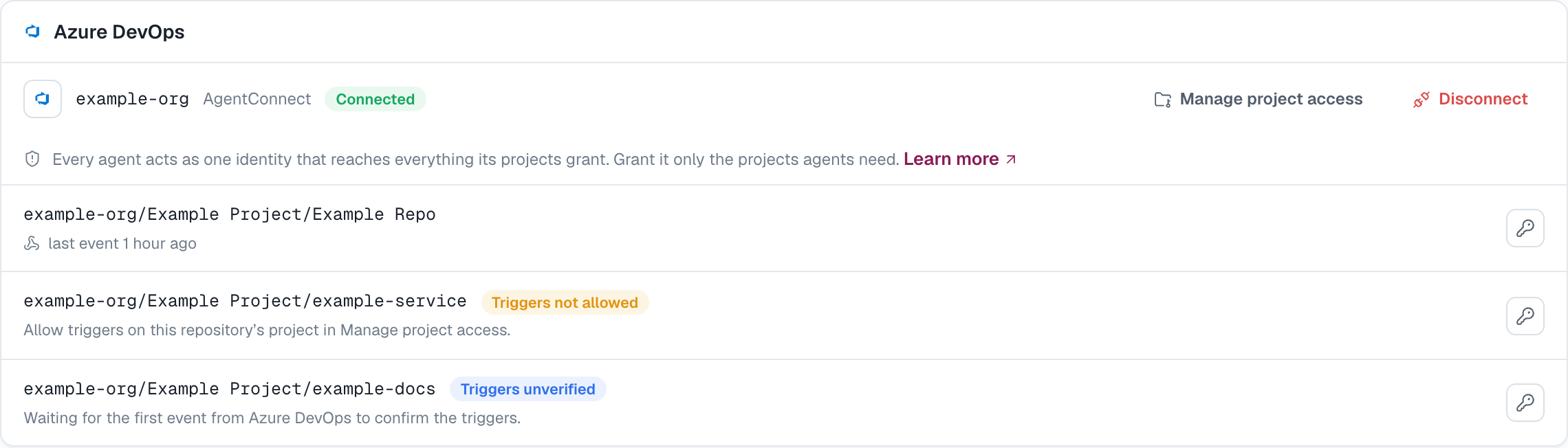
A repository with triggers shows when its last event arrived, or a badge when something needs attention:
| Badge | What to do |
|---|---|
| Triggers unverified | Nothing: it clears when the first event arrives. |
| Triggers not allowed | Turn on Allow triggers for the project in Manage project access. |
The key icon on a row rotates the secret Azure DevOps signs its deliveries with. The old secret keeps working for 36 hours, so deliveries already queued still arrive.
Access is enforced by the daemon
Azure DevOps cannot issue a token limited to one repository or to read access. So the token never enters an agent's session: Git and the Azure CLI reach Azure DevOps through the daemon's credential proxy, which presents the real token only for the agent's own repositories and refuses a push or an API write below write.
The Azure CLI with the azure-devops extension works unchanged in a session — az repos show, az repos pr create, az repos pr update and the rest. AgentConnect does not install it: install the Azure CLI and the extension on the daemon host. Listings that would reveal other repositories, such as az repos list or listing pull requests without --repository, are refused.
Agents also get three tools that need no CLI: azureDevOpsPullRequest (open, edit, complete, abandon, reactivate, and labels), azureDevOpsComment (comment threads and replies), and readAzureDevOpsPullRequest. A pull request they open carries the agent's footer.
Watch a repository
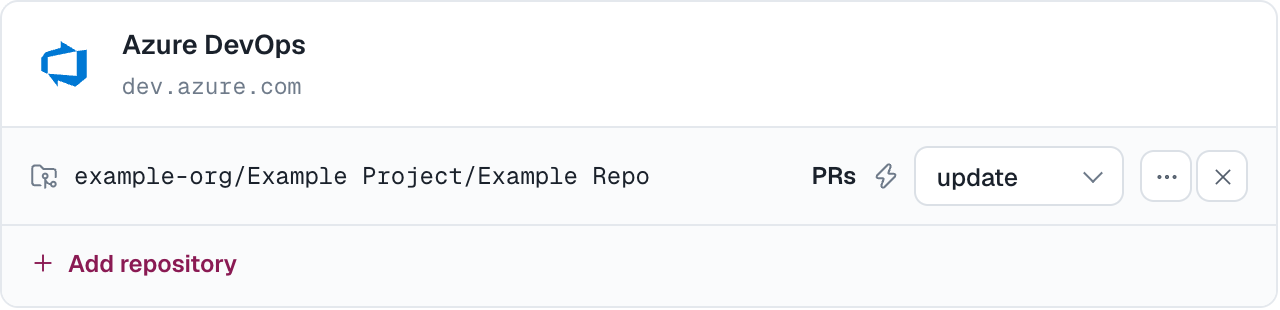
On the agent: Integrations → Add integration → Azure DevOps.
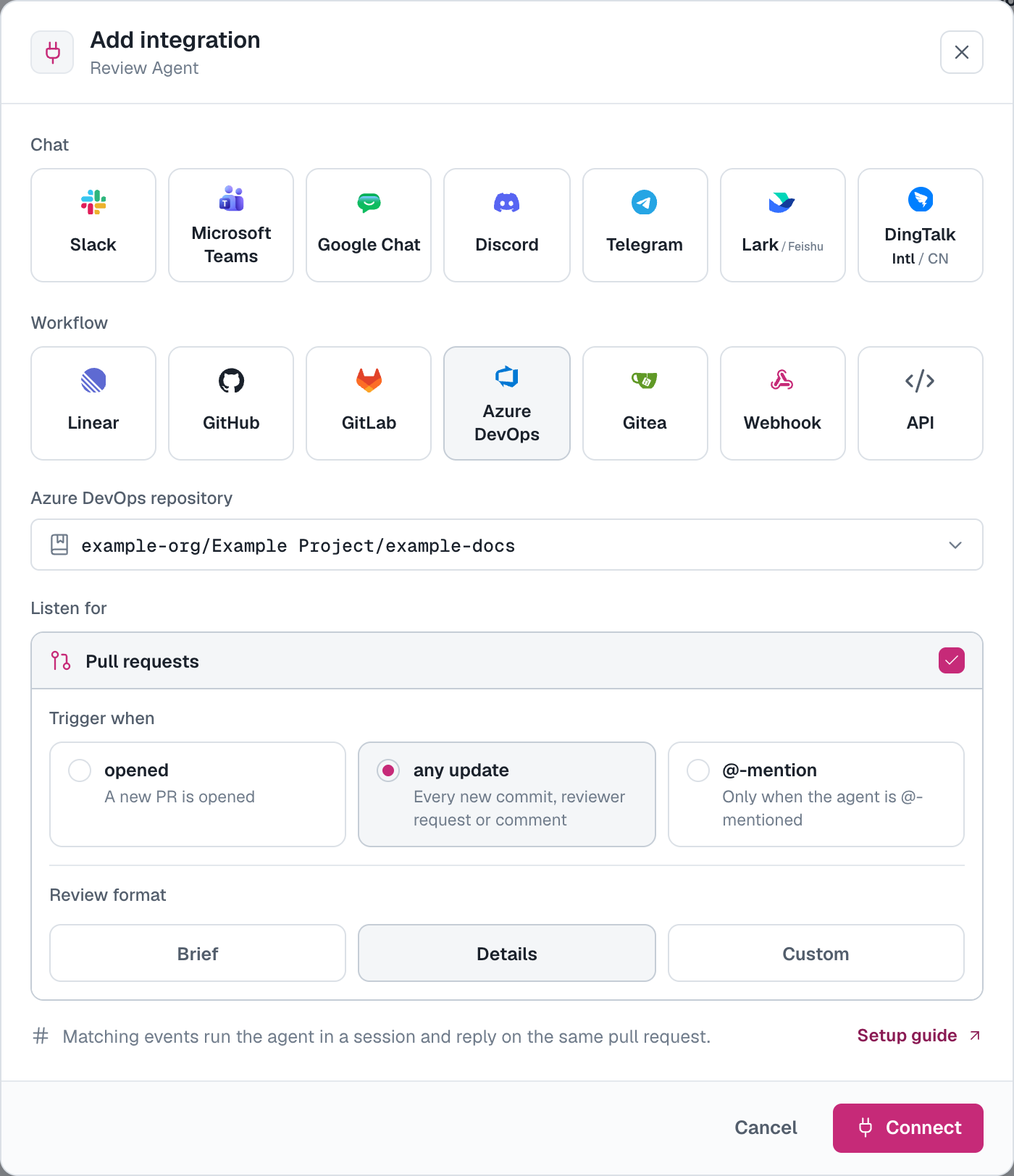
The repository must already be the agent's workspace or one of its additional repositories, and its project must have Allow triggers. Choose how eagerly the agent wakes up on pull requests:
- opened — when a pull request is opened.
- any update — openings plus new commits, a reopened pull request, and comments.
- @-mention — only when the pull request's description or a comment mentions the agent as
@<agent-name>.
Whatever the cadence, adding the AgentConnect application to a pull request as a reviewer requests a review. Azure DevOps's reviewer picker lists people only, so this request comes from the REST API or az repos pr reviewer add.
AgentConnect creates and maintains the repository's service hooks itself — one per kind of event the agent's triggers need — and removes them when the last trigger goes away. Several agents watching one repository share them.
Who may trigger an agent
AgentConnect checks, at the moment of the event, whether the person who caused it may contribute to the repository: their own permissions and those of every group they belong to, read from Azure DevOps. A person who cannot push to the repository does not start an agent. For a review request or a reopened pull request, the pull request's author is checked. Edits to comments and likes never start a turn.
The application's own comments never trigger an agent. A pull request the application opened in the same repository still enters review, which is how one agent reviews another's work, and a commit the application pushes to a pull request is a new revision like anyone else's.
What the agent does
Each qualifying event starts a session on the agent's daemon, and the sessions appear in Sessions linked back to the pull request.
- Reply — a comment in the thread that triggered the turn, or a new thread on the pull request. The triggering comment gets a like when the turn starts.
- Reviews — with a review format chosen on the trigger, an opened pull request, a new commit or a review request gets a formal review: one comment thread per inline comment (a range of lines stays a range), a summary thread, and a vote — Approved (10) for an approval and Waiting for author (−5) for requested changes. A comment-only review leaves the vote alone. A mention gets a reply in its thread, not a formal review.
- Run state — a pull-request status named
agentconnect/<agent-name>, linking to the session in the console. It blocks completion only if an administrator adds it as a required status check in a branch policy.
To run an agent again on a pull request, comment in the session, push a new commit, or mention the agent.
Every agent acts as the same application, so it has one vote on a pull request: the most recent review sets it. Each agent's own verdict stays in its summary thread and its status.
Disconnect
Disconnect removes AgentConnect's service hooks and releases the connection; agents stop working on its repositories. To remove the application from Azure DevOps entirely, remove it from Organization settings → Users and, if you want, delete its enterprise application in Microsoft Entra.
Self-hosted deployments
Everything above works the same on AgentConnect OSS. The operator configures the deployment's Microsoft application once and adds the console's Azure DevOps connect page as one more redirect URI: see Microsoft Teams deployment app. Without a deployment application, organizations use their own application.
How is this guide?